All About Documents
Improving our Community One Click at a Time!
Welcome to the documents tab!
Here you will find all the basics about documents. Need to download, access a file, duplicate, or create a PDF? Keep reading!
DOWNLOADING DOCUMENT
Follow the steps to efficiently download a document!
GUIDE


ACCESS FILES
Follow the steps to efficiently access your files!
GUIDE

File App
Find your file app on your device and find the section where your file must be located.

Open File
Find your file and double click it and you've officially opened your document.
DUPLICATE DOCUMENT
Follow the steps to efficiently duplicate a document!
GUIDE

Open Word/Google Drive
Find your document on your homepage of your desired document.

File Tab
Find the file tab on the top role of icons on your platform.

Find Document
Find your document and open it by clicking on it.

Make a Copy
Hoover your cursor over the make a copy tab and click it.
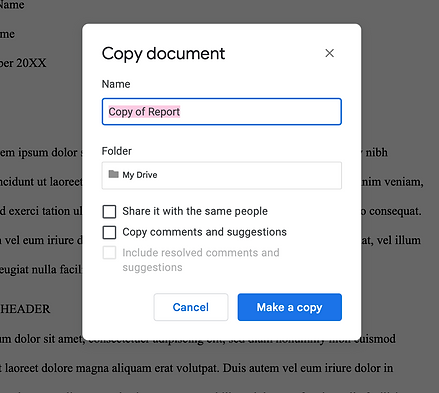
Name and Save
Now name your copy and click 'Make a copy' and you are done!
HOPE THIS HELPS
For more information reach out to us or book with us!